

The green dot has become a silent source of modern anxiety. You open Instagram to mindlessly scroll, and within seconds, you are marked as “Active Now,” a digital flare visible to followers and colleagues alike. It creates an implicit pressure to respond, a sense of being “tracked” by friends who know you saw their message but didn’t reply. This constant connectivity can feel exhausting, transforming a space for leisure into a space of digital surveillance. For those who value privacy or simply want to reclaim their time without the pressure of being “seen,” learning how to turn off active status on Instagram is a crucial digital life skill.
The recent integration of AI into search engines and social platforms has accelerated the conversation around data privacy. Users are becoming more conscious of their digital footprints, seeking ways to control what information they broadcast. The demand for methods on how to turn off active status on Instagram has surged, driven by a desire for “stealth” scrolling and freedom from the social obligations of instant messaging. This guide offers a deep dive into the privacy mechanics of Instagram, providing authoritative steps to manage your online status effectively.
The Intricacies of Instagram’s Activity Status System
Before adjusting your settings, it is essential to understand what the activity status actually represents. When you are active, a small green dot appears next to your profile picture in the Direct Message (DM) inbox and in the lists of people who follow you. This indicator has become a shorthand for availability, signaling to others that you are present and theoretically ready to chat.
However, the feature is more nuanced than a simple on/off switch. Instagram also displays the duration since you were last active—for example, “Active 10 minutes ago” or “Active 3 hours ago.” This timestamp provides a timeline of your engagement with the platform. It’s important to note that this feature is reciprocal; if you deactivate your status to protect your privacy, you will also lose the ability to see the activity statuses of others. This is a non-negotiable trade-off built into the platform’s design.
A Step-by-Step Guide to Mastering Your Online Status
The process to disable this feature has been streamlined to be consistent across different operating systems. Whether you are using an Android device, an iPhone, or a desktop browser, the core settings remain accessible. The path to achieving digital invisibility is straightforward.
Turning Off Status on Mobile Devices (Android and iOS)
For the vast majority of users who access Instagram via the mobile app, the path to disabling activity status is uniform. You do not need to navigate different menus based on whether you have an Apple or Google device.
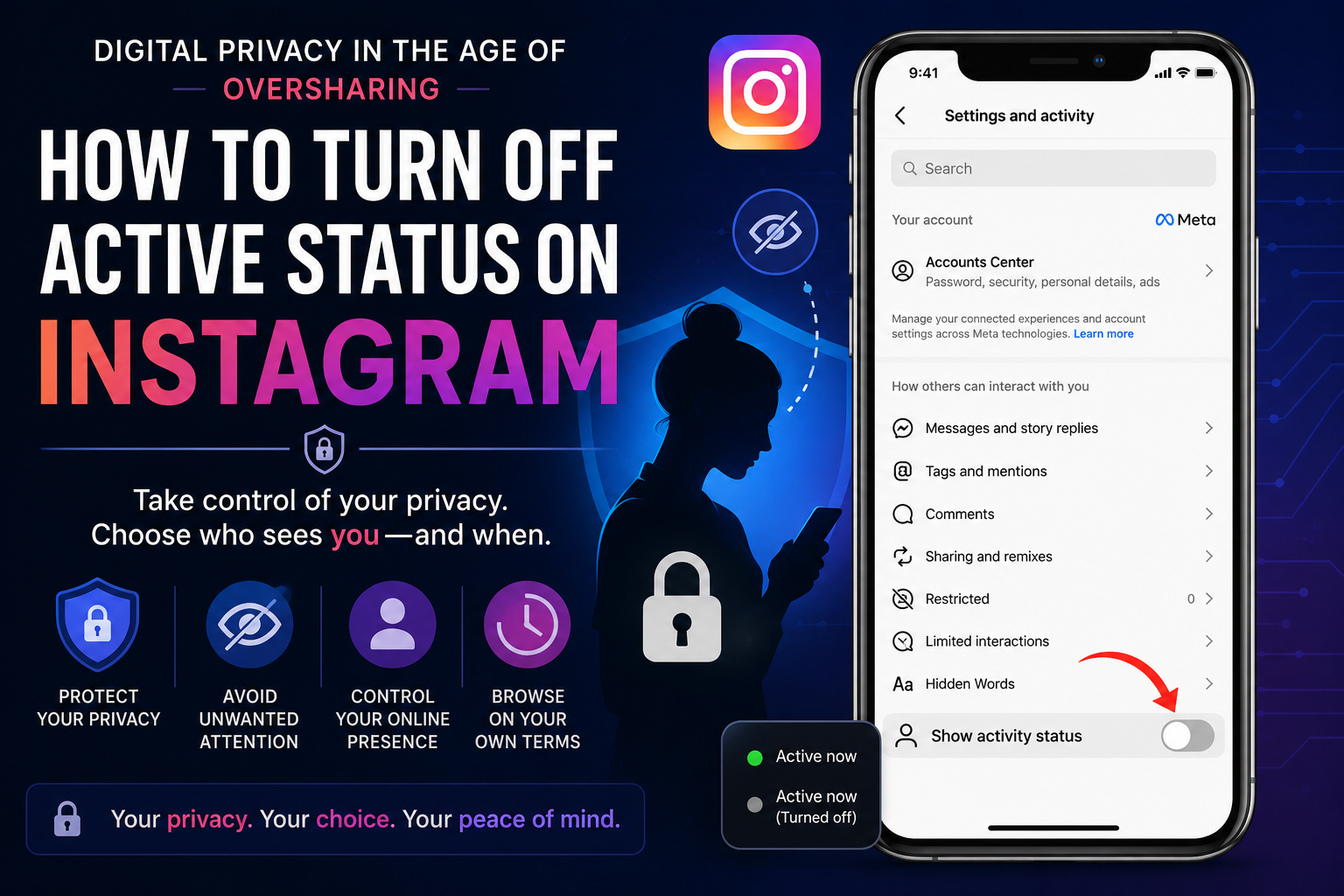
Start by tapping your profile photo in the bottom right corner to access your profile page. Next, tap the three horizontal lines in the top right corner to open the settings menu. From the pop-up menu, select “Settings and privacy.” Within this expansive menu, you must scroll down to find the section labeled “Messages and story replies” (this section is sometimes located under a sub-menu like “How others can interact with you”). Tap this option, and you will see a specific toggle for “Show activity status.” Simply tap this toggle to turn it off, removing the green dot from your profile.
Managing Status Through a Web Browser
If you manage your account from a desktop or laptop computer, the navigation path follows a similar logic but with a different visual layout. This is particularly useful for individuals who manage their account remotely or prefer the larger interface.
Log into your account on the Instagram web browser, and click the “More” option located in the bottom left corner. Select Settings from the menu that appears. In the settings panel on the left side of the screen, click on “Messages and story replies.” You will then see the option for “Show activity status.” Uncheck this box to save the change. The setting will sync across your account, ensuring your status is hidden even if you switch back to the app later.
Navigating the Realities of Invisibility
Understanding the consequences of disabling this feature is as important as knowing how to do it. The primary benefit is a significant boost in data protection and peace of mind. You can open the app to check notifications, browse your feed, or watch Reels without feeling the social pressure to immediately engage with someone who sees you are online.
However, the reciprocity rule is absolute. Once you successfully turn off active status on Instagram, you lose the ability to see when your friends were last active. You will no longer see the green dot or the “last active” timestamps associated with their accounts. This can feel frustrating if you are used to checking availability. Furthermore, while you will remain “invisible” to most, it is worth noting that if you are in a direct message thread, the other person might still be able to infer your activity if you are actively typing or if they have turned off their own status restrictions.
Common Misconceptions and Troubleshooting
There are a few persistent myths regarding the activity status that often lead to user confusion. One of the most common questions is whether you can hide your status from a specific person only. The platform does not currently support selective hiding. The activity status feature is a global on-off switch; toggling it off hides your status from everyone. Attempting to block an individual is the only workaround, but that is a drastic measure compared to simply controlling your own visibility.
Another area of confusion involves the “green dot” and its reliability. In reality, the dot and timestamps are not perfect. Studies have shown that the “Active Now” status can lag, often showing a user as active when the app is simply running in the background. This is why many users prefer to just turn off active status on Instagram to avoid the inaccuracies that might suggest they are ignoring messages when they are not. Poor internet connections or background app activity can further delay updates, leading to inaccurate readings.
Key Takeaways
- Consistent Settings: The toggle for “Show activity status” is found in “Messages and story replies” under “Settings and privacy” on both Android and iOS.
- Desktop Option: For web users, the path is the same: Settings > Messages and story replies > Show activity status.
- The Trade-off: Disabling your status means you cannot see the active status of others. This is a reciprocal feature.
- No “Selective” Hiding: You cannot hide your activity status from just one person or group.
- Myth Busting: The green dot is not always accurate and can show as active if the app is open in the background.
The Evolving Landscape of Online Privacy
The ongoing development of social media platforms points toward greater user control over data, but it also raises concerns about the monetization of that data. As Meta pushes forward with AI features and augmented reality, the data collected from user behaviors, including online status, becomes increasingly valuable. Being able to control these elements is becoming a necessity for users who wish to limit their exposure and maintain healthy digital habits.
By taking control of your privacy settings, you are joining a growing movement of digital citizens who prioritize their mental well-being over the demands of instant digital responses.
Frequently Asked Questions
1. How to turn off active status on Instagram for a specific user?
Instagram does not provide a function to hide your active status from a single user while showing it to others. To remove your status from everyone, you must use the global toggle in Settings > Messages and story replies. If you truly need to hide from just one person, blocking them is the only, albeit severe, option.
2. Can I see if someone is online if they have their activity status turned off?
No. When a user turns off their activity status, they become invisible to the entire platform. This means you will not see a green dot or a “Last Active” timestamp on their profile. The only way to tell if they might be online is if they are actively typing a message to you.
3. Does Instagram notify people when I check their profile or activity status?
No. Instagram does not send notifications to users when someone checks their profile or views their activity status. The platform prioritizes user privacy in this regard. You can view profiles and check for green dots without the other user being alerted to your presence.
4. How do I turn off activity status on Instagram on a computer?
You can access the same settings through a web browser by logging in, clicking “More” in the bottom left corner, going to Settings, and selecting “Messages and story replies.” Uncheck the box labeled “Show activity status” to save your preferences.
5. If I turn off my active status, will people see my “Last Active” time?
No. Toggling off the “Show activity status” feature completely hides your presence. Other users will not see a green dot nor will they see a timestamp indicating when you were last using the app. You effectively disappear from their activity log.
Conclusion
Navigating the nuances of social media privacy is a modern necessity. The ability to move through Instagram without a digital tether—without the green dot broadcasting your every move—is a powerful form of reclaiming personal space. While the reciprocal nature of the feature means losing visibility of others, the gain in data protection and peace of mind is invaluable for many users.
As platforms evolve and our digital footprints grow, understanding how to turn off active status on Instagram is not just a tech tip; it is a step toward establishing healthier boundaries. We encourage you to take control of your digital identity today. Explore your settings, adjust your privacy levels, and share this knowledge with your network so they too can navigate the digital world on their own terms.
You Mey Olso Read
The Telltale Signs: How to Tell if Someone Has Snapchat Plus
